
Use the Wireless Network
Which network do I connect to?
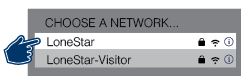
| Wi-Fi Network Name | Who should use it? |
|---|---|
| LoneStar |
LSC-affiliated students and employees |
| LoneStar-Visitor |
All other visitors |
How do I connect my personal mobile device or laptop to the wireless network (Wi-Fi)?
LSC students, faculty, and staff:
Connect to the LoneStar network and log in using your LSC email and password.
All other visitors and guests:
Connect to LoneStar-Visitor network. No login credentials are required.
- Locate the "LoneStar-Visitor" network in the list of available Wi-Fi networks and select it.
- It will prompt you with a certificate. (Note: laptop users will need to open a web browser to see the certificate.)
- Once you accept the certificate, it will connect you to the Wi-Fi.
For troubleshooting or further assistance with network connectivity, please contact the Office of Technology Services or call the IT Service Desk at 281.318.HELP (4357).
Is the wireless network secure?
The LSC wireless network is as secure as any open public access network. It is always a good idea to make sure you are on an SSL-encrypted web page prior to sending or receiving confidential data.